
Using Duckdb to process CSV files
Duckdb is an in process database, much like sqlite for oltp databases, duckdb is for olap, it is easy to integrate with, has lots of native clients and can be used via cli.
Primarily for processing local analytical data where a normal database would struggle but not quite at big data level. It even has a ui if you prefer to run your queries in a notebook, convenient the notebook is persisted.
I have the need to process gigabytes of csv files that are to be sent to an ingestion process, the columns in the csv files have to be in a specific order and specific data types, they also need to be batched into files under 100mb to be processed by the ingest system. I have a few javascript files that allow me to do these things currently, but are less flexible if any other issues arise, duckdb supports all the operations needed.
Processing files
You can read a csv file using sql
SELECT * FROM ‘covers.csv’;Duckdb makes a best quest at the correct column types. You can use the read_csv to pass in options needed when reading the csv files. It can also read JSON and parquet files.
You can also read multiple files:
SELECT * FROM ‘*.csv’;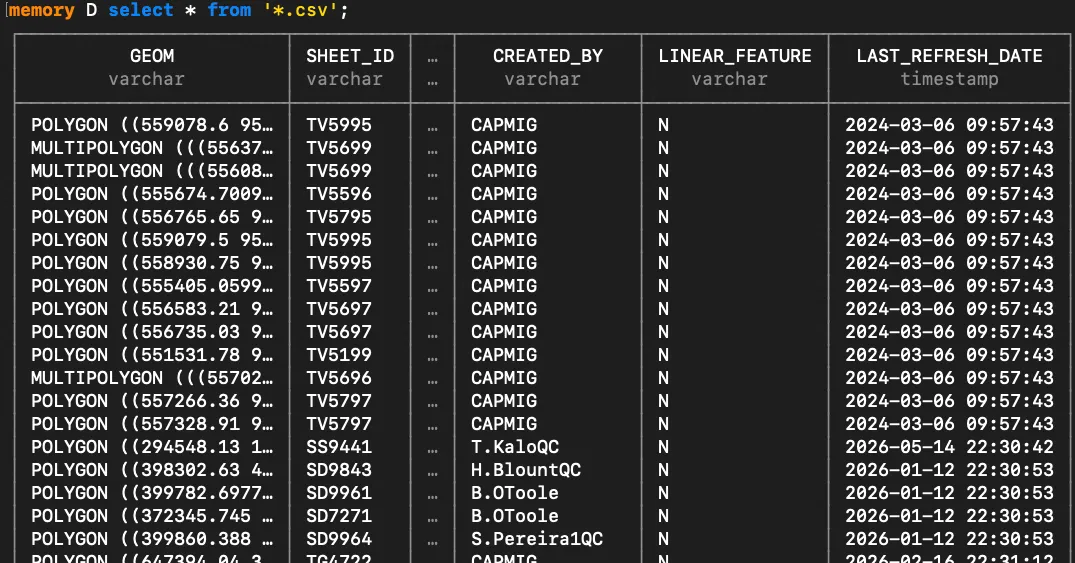 You get a preview of the columns and types, and also a row count.
Table
If we want to do any more processing we may want to insert the data into a table.
CREATE TABLE covers AS from '*.csv';This table only exists in memory for now, if you want to persist the table you can EXPORT the database to a file and then IMPORT it to use the database.
We can check what columns and types have been created
describe covers;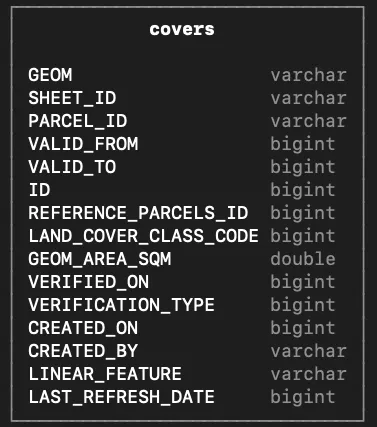
Duckdb supports geometry natively and spatial functions using a core extension.
ALTER TABLE covers
ALTER GEOM SET DATA TYPE geometry;
Also want to make last_refresh_date a timestamp.
ALTER TABLE covers ALTER last_refresh_date
SET DATA TYPE timestamp using strptime(cast(LAST_REFRESH_DATE as varchar), '%Y%m%d%H%M%S')
You can also export the data back to csv with the columns in the order we need and sized appropriately.
COPY (SELECT id, verified_on FROM covers) TO 'covers_pr.csv' (FILE_SIZE_BYTES '90mb');Duckdb can also read and write from other databases like sqlite, postgresl and mysql, allowing you to read directly from the database or insert data from duckdb to a database. sqlite-utils is a similiar utility for working with sqlite databases that also allows you to ingest different file formats.

